The Absolute King of Cables
Look closely at your desk right now. Your laptop, phone, monitor, wireless headphones, and external hard drive likely all connect to power and data using an identical, slim, reversible port: USB-C.
This single, elegant interface has quietly pulled off one of the greatest tech takeovers in history, rendering dozens of legacy power bricks and data standards completely obsolete. But to truly appreciate how impressive this universal convergence is, we have to look back at the absolute chaos that preceded it.
1. The Era of Broken Compatibility: Why We Needed So Many Ports
In the early 1990s, the back of a personal computer looked less like a refined piece of consumer electronics and more like an industrial switchboard.
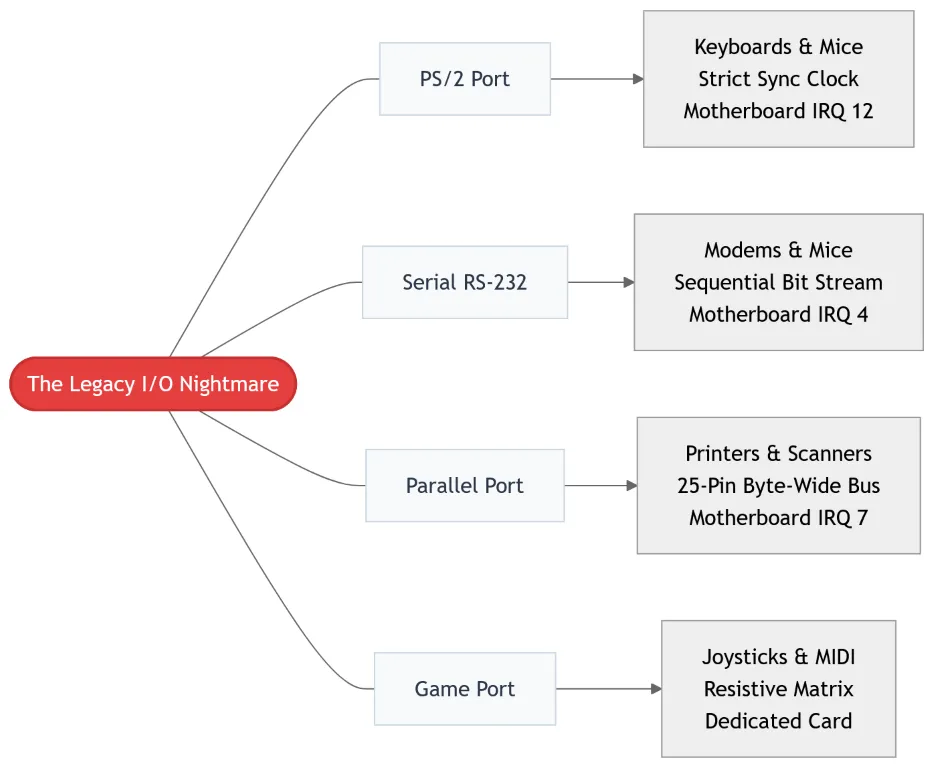
Back then, we didn’t question this complexity. As tech consumers, we simply accepted that a desktop computer required an army of specialized, single-purpose cables just to function. If you bought a joystick, it couldn’t share a port with a printer because their internal communication models were fundamentally mismatched.
The Technical Divide
These legacy ports were built around distinct electrical and computational philosophies out of pure engineering necessity:
- Serial vs. Parallel: Serial ports sent data sequentially down a single wire, making them slow but capable of running over long distances. Parallel ports sent 8 bits of data simultaneously over 8 parallel wires. This made them much faster over short distances, but they required thick, unwieldy cables susceptible to electromagnetic cross-talk.
- Synchronous vs. Asynchronous: Keyboards required simple, low-latency, state-driven connections (like the PS/2 port) that sent small interrupts directly to the CPU. Storage devices, meanwhile, required massive, sustained data pipelines.
- The Resource Crunch: Every single one of these legacy ports required its own dedicated hardware resources on the motherboard, known as Interrupt Requests (IRQs) and I/O memory addresses. If two devices accidentally claimed IRQ 7, your entire system would crash.
Furthermore, none of these ports supported “hot-swapping.” If you plugged in a mouse while the computer was turned on, you risked blowing out a fuse on the motherboard or hard-freezing the operating system.
2. The Open Standard Solution: USB 1.0 (1996)
To solve this hardware fragmentation, a massive cross-industry alliance consisting of Intel, Compaq, Microsoft, and Digital Equipment Corporation formed the USB Implementers Forum (USB-IF). They released the USB 1.0 specification in 1996, fundamentally redesigning how peripherals talk to computers.
The Architecture Shift
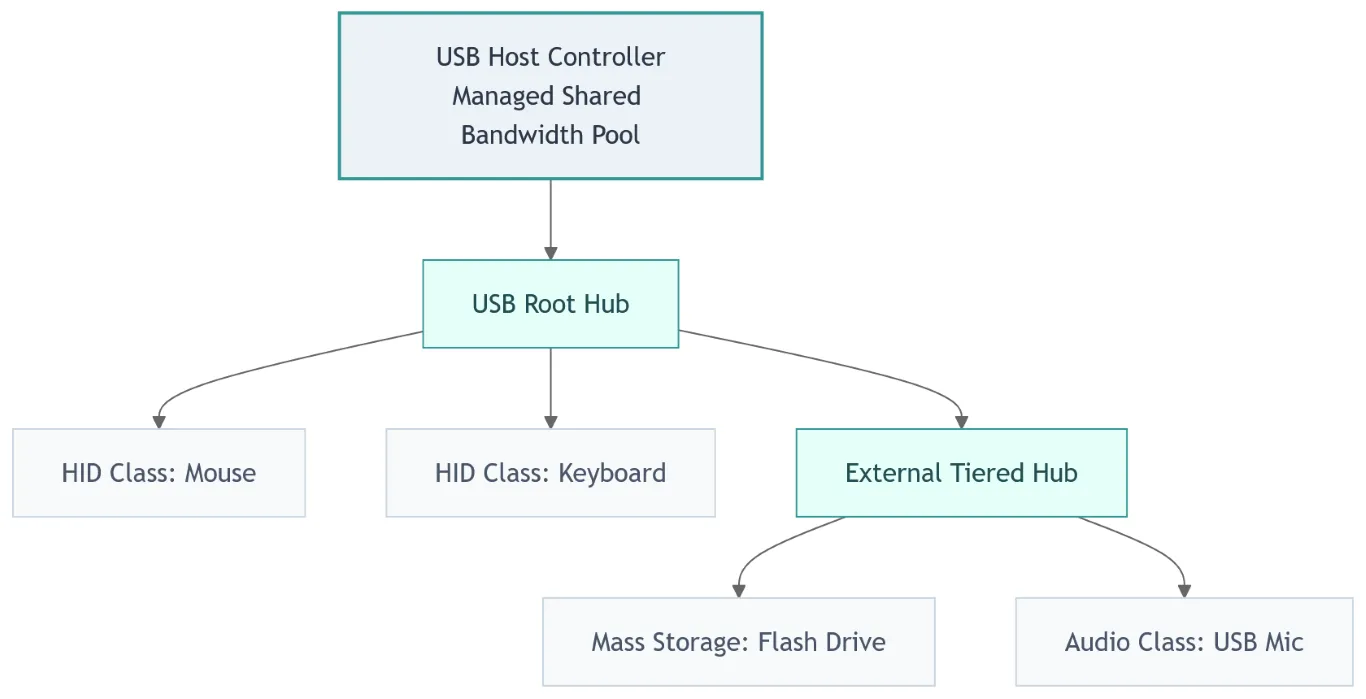
Instead of allocating a rigid, separate hardware port to every peripheral, USB treated the computer’s peripherals like nodes on a local network. Using a simple four-wire cable—VBUS (5V power), Ground, and a differential data pair (D+ and D-)—USB deployed a tiered-star topology.
A single Host Controller on the computer dynamically managed the entire bus, scheduling packets and splitting a shared pool of bandwidth among up to 127 connected devices through a chain of hubs.
3. The Great Cable Wars: USB vs. FireWire
The rise of USB was not a peaceful, inevitable march. It was forged in a brutal, decade-long commercial and political marketing battle against a technically superior rival: Apple’s FireWire (IEEE 1394).
The Great Interface War: Architectural Comparison
Mass Peripherals
Apple Mac Ecosystem
The Technical Superiority of FireWire
In the late 90s and early 2000s, FireWire was objectively better than USB. While USB 1.1 maxed out at a crawling 12 Mbps, FireWire 400 blazed at 400 Mbps. More importantly, FireWire used a Peer-to-Peer architecture with Direct Memory Access (DMA).
This meant a FireWire video camera could dump data directly onto an external hard drive without needing to route packets through the computer’s CPU. USB, conversely, relied entirely on the host CPU to manage every single packet transaction, dragging down system performance during intensive data transfers.
Rebalancing the Scales: The Hidden Innovations of USB
While Apple’s FireWire won the initial sprint on raw speed, USB pulled ahead due to structural architectural innovations that made it a superior tool for the mass market:
- Asymmetric Topology (Stupid Devices, Smart Host): FireWire required expensive, high-end processing controllers inside every single device because it was a peer-to-peer network. This meant a FireWire mouse or keyboard would have cost an astronomical amount to manufacture. USB intentionally threw all the computational heavy lifting onto the computer’s host CPU. This kept peripheral silicon incredibly simple, tiny, and dirt cheap to make.
- The Dynamic Software Stack: USB introduced a robust abstraction layer called “Device Classes” (like Mass Storage, Human Interface Device, and Audio). For the first time, a manufacturer didn’t have to write custom assembly code or specialized drivers for every new mouse or keyboard. The computer’s operating system could look at a generic USB peripheral, identify its class, and talk to it instantly.
- The Royalty Tax Shift: Apple demanded a strict $1-per-port royalty fee for FireWire. The USB-IF offered an open, royalty-free framework. Combined with Intel baking USB controllers directly into consumer chipsets, USB achieved massive, unmatched economies of scale.
The Tech Upgrades
As consumer data demands grew, USB couldn’t rely on business strategy alone; it had to evolve from a simple convenience into a high-speed necessity. To outpace FireWire’s technical lead, the USB standard underwent a series of massive underlying engineering upgrades:
- USB 2.0 (High-Speed): Launched in 2000, this iteration boosted signaling rates from 12 Mbps to 480 Mbps by aggressively increasing the clock rate on the existing D+/D- lines. It also introduced USB On-The-Go (OTG), allowing mobile devices like phones to act as hosts for accessories like flash drives without requiring a full desktop computer.
- USB 3.0 (SuperSpeed): Released in 2008, this standard completely shifted the structural paradigm. To leap past the bandwidth limits of old copper wiring, it added five entirely new wires—two differential pairs for transmitting data, two for receiving, and a dedicated ground—alongside the original four USB 2.0 lines. This configuration enabled true full-duplex communication and jumped speeds to an incredible 5 Gbps, while maintaining perfect backward compatibility.
By the time USB 3.0 launched in 2008, FireWire was effectively dead outside of niche audio-visual engineering spaces.
4. The Lightning Interlude: Apple’s Proprietary Bridge
As mobile electronics exploded in the late 2000s and devices scaled down from desktop towers to smartphones, the standard USB-A port proved to be far too large. To bridge the gap, the industry entered a messy transitional era of specialized, miniaturized form factors:
- Mini-B: The early standard for digital cameras and MP3 players.
- Micro-B: The long-standing standard for Android phones, infamous for fragile internal tongues, non-reversible orientation, and easily damaged ports.
- USB 3.0 Micro-B: A clunky, asymmetric, dual-stage connector used on external hard drives to awkwardly house the extra SuperSpeed copper lines.
While the rest of the industry struggled with the structural fragility of Micro-USB, Apple decided to break away from standard multi-port confusion. In 2012, frustrated by the lack of an elegant mobile standard, Apple bypassed the slow-moving USB-IF alliance entirely and launched the Lightning connector alongside the iPhone 5.
Apple Lightning Reversible Pin Array
GND
L0p Data
L0n Data
ID0 Ctrl
PWR
L1n Data
L1p Data
ID1 Ctrl
- Internal chip dynamically reassigns pins
Why Lightning Was Revolutionary
Long before USB-C hit the mainstream, Lightning gave consumers their first taste of true connector bliss:
- Fully Reversible: It didn’t matter which way you flipped the cable; it slid into the phone with a satisfying mechanical click.
- Dynamic Pin Assignment: Lightning utilized an integrated authentication chip inside the plug. When inserted, the phone would read the orientation pin and dynamically route data and power channels to match the cable’s direction.
- Extreme Durability: Unlike Micro-USB, which placed a fragile spring-loaded “tongue” inside the device’s port, Lightning was a solid, unbendable metal tab. If the cable tab broke, you just bought a new cable—your expensive phone port remained safe.
The Licensing Wall
Lightning was an engineering triumph for 2012, but its proprietary nature limited its lifespan. Apple locked the ecosystem tightly behind its Made for iPhone (MFi) licensing program, collecting lucrative royalties on every third-party cable sold.
While it successfully protected Apple’s accessory revenue for over a decade, it sowed the seeds for a massive political backlash from global consumer advocacy groups and regulators.
5. Convergence: How USB-C Ate the Tech Industry
Recognizing that the mobile landscape was entirely fractured, the USB-IF went back to the drawing board to build a final, all-encompassing physical standard: USB Type-C.
USB Type-C 24-Pin Receptacle Layout
GND
TX1+
TX1-
VBUS
CC1
D+
D-
SBU1
VBUS
RX2-
RX2+
GND
GND
RX1+
RX1-
VBUS
SBU2
D-
D+
CC2
VBUS
TX2-
TX2+
GND
The Ultimate Multiplexer
USB-C packs 24 pins into a tiny, reversible housing. The defining technical achievement here lies in the Configuration Channel pins (CC1 and CC2).
When you insert a USB-C plug, the host controller detects which CC pin is grounded out. Within milliseconds, high-speed internal hardware multiplexers route the differential data transmission lines (TX1/2 and RX1/2) to align perfectly with the plug’s orientation.
The Protocols That Disrupted Everything
USB-C completely conquered the hardware world by implementing two foundational technologies that expanded its capabilities far beyond simple data transfer:
1. USB Power Delivery (USB-PD)
Historically, USB ports only supplied a tiny stream of electricity (2.5W to 4.5W), barely enough to power a mouse or slowly charge an old phone. USB-PD introduced a smart, software-level handshake over the CC lines.
The charger and the connected device actively negotiate dynamic voltage and current profiles. Under the modern Extended Power Range (EPR) specification, USB-C can ramp up from a standard 5V baseline all the way to 48V at 5A, delivering up to 240W of power down a single cable. This successfully eliminated the need for specialized barrel jacks on everything from monitors to high-end laptops.
2. Alternate Modes (Alt Mode)
USB-C features four high-speed physical differential pairs. Through Alt Mode, the host and client can agree to completely decouple these physical copper wires from the standard USB data controller.
Instead, they route native, uncompressed native video signals directly down the cable. This allows a single USB-C cord to carry DisplayPort or HDMI video feeds while simultaneously passing power and data.
6. The Present Frontier: USB4 and Protocol Tunneling
Today, USB-C has progressed into the USB4 era. Rather than relying on physical switching like old Alt Modes, USB4 treats the connection like an ultra-high-speed transit tunnel.
 Using a mechanism called Protocol Tunneling, USB4 takes diverse, completely separate data types—PCIe traffic from an external graphics card, DisplayPort streams for an 8K monitor, and legacy USB 2.0 packets—and chops them into uniform, prioritized packets.
It then dynamically balances the bandwidth in real time across the physical link, pushing up to 80 Gbps (or 120 Gbps asymmetrically in USB4 2.0). Because Apple integrated this open USB4 infrastructure across its Macs and iPads, and the European Union legally mandated a common charging port, even the proprietary Lightning port was permanently retired in favor of USB-C.
USB Bandwidth Scaling Evolution
12 Mbps
480 Mbps
5 Gbps
40 Gbps
120 Gbps
7. The Unreachable Borders: Where USB Cannot Go
We have functionally reached the “final form” of physical consumer connectors; the USB-C footprint will remain our standard for a very long time because the underlying lanes still possess substantial headroom to handle future frequency upgrades. However, there are fundamental physical and network design boundaries that USB can never cross.
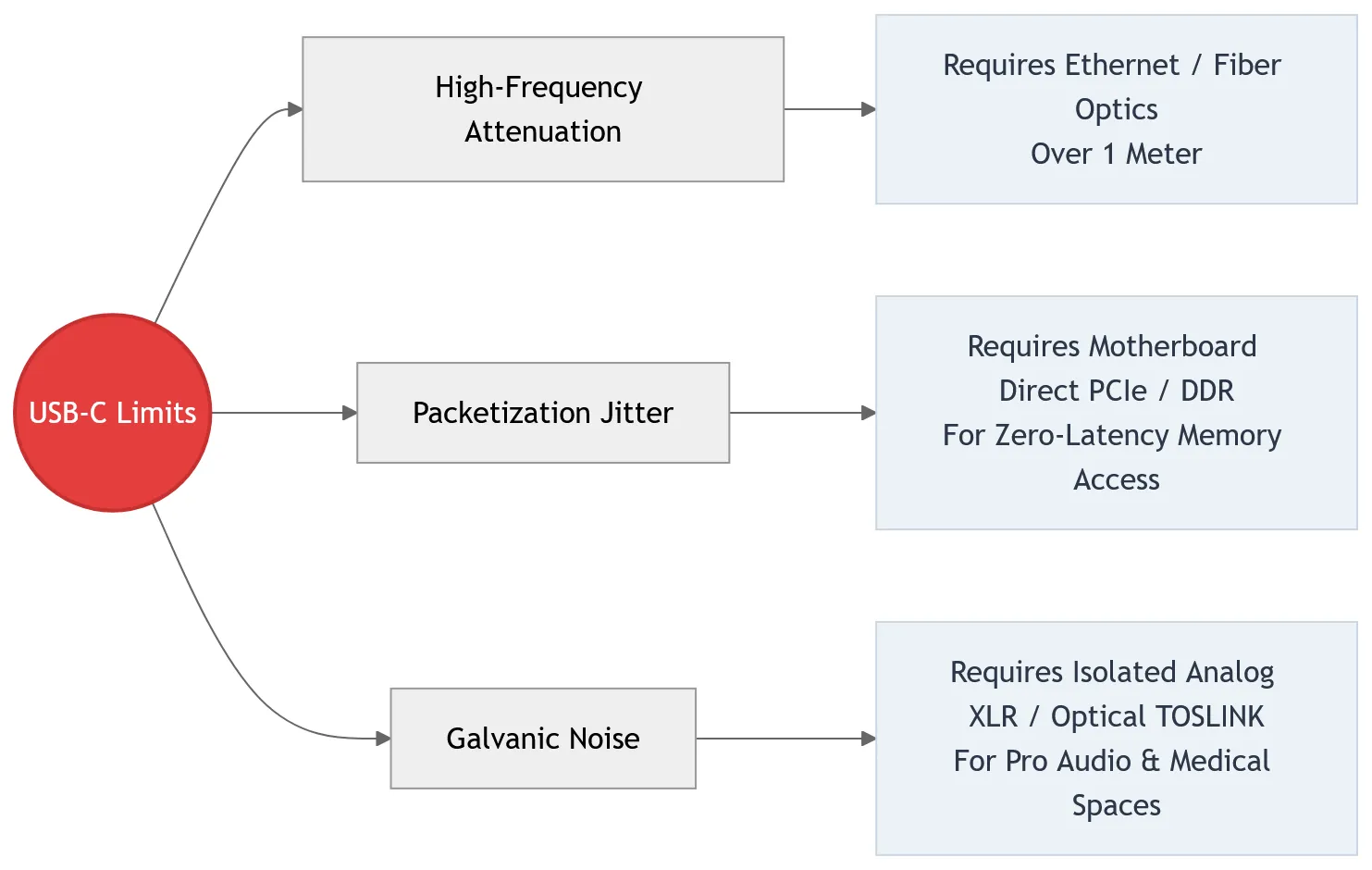
1. The High-Frequency Attenuation Wall
As data speeds push past 40 Gbps, electrical signals moving through copper wires degrade exponentially due to the skin effect and high-frequency attenuation. A passive USB4 cable cannot exceed 0.8 to 1 meter without corrupting data.
While Ethernet cables are also copper and can stretch up to 100 meters, they operate by utilizing far tighter internal wire twists and robust shielding to aggressively negate external interference, all while using a much lower frequency signal mixed with complex mathematical error correction—sacrificing instant, absolute raw speed for long-distance durability. USB, demanding maximum raw throughput across a tiny footprint, hits a physical wall at arm’s length. Long-distance infrastructure across homes or server rooms will always require specialized networking cables like Category 6a/7 Ethernet or fiber optics.
2. The Packetization Jitter Wall
Because USB is a polled, packetized bus topology, data must be encapsulated in headers, scheduled by a controller, and sent in bursts. This introduces microsecond-level latency and packet jitter.
For ultra-high-speed, real-time internal bus operations—such as connecting system RAM to a CPU—USB can never replace the direct-memory access pathways of a motherboard’s native DDR or internal PCIe slots.
3. The Galvanic Noise Wall
Packaging high-voltage power lines alongside ultra-high-frequency data streams inside a single, tightly shielded sleeve creates a hotbed for electromagnetic interference (EMI).
In precision spaces like medical imaging or professional audio recording, the electrical noise bleeding across a USB cable’s ground plane can disrupt delicate signals. These fields will continue to rely on completely isolated analog formats like balanced XLR or immune digital mediums like optical TOSLINK cables.
8. Conclusion: The Triumph of the Universal Bus
When the first USB specification dropped in 1996, it was widely mocked by the power-user community. It was the ultimate underdog—technically slower than FireWire, heavily reliant on the host computer’s CPU, and dismissed as a “cheap fix” for low-end mice and budget keyboards.
Yet, USB possessed a hidden superpower: an absolute, uncompromising commitment to being an open, accessible, and adaptive platform.
By forcing peripheral devices to be “dumb” and making the main computer host “smart,” USB democratized hardware manufacturing. It gave rise to an entire global industry of affordable accessories, paving the way for the plug-and-play world we live in today. It quietly outlasted corporate giants, absorbed the best features of its competitors, and broke through physical data limits using brilliant software architectures like protocol tunneling.
What started as a fragile, slow four-wire cord has evolved into an unstoppable computational force. USB didn’t just replace the cables on our desks—it unified the entire tech industry under a single, open standard, proving that in the technology world, collaborative adaptability beats proprietary isolation every single time.